Timing analysis and optimization
- Quartus provides tools to perform timing analysis and analyse critical paths
- Snapshots allow timing analysis and design visualization through the
flow
- Most easily accessed through the Compilation Dashboard
- Timing Analyzer
- report on paths by clock and by path node
- Visualize constraint waveform
- Chip Planner
- Visualize physical placement and routing
- Technology map viewer / RTL viewer
- schematic diagram of logic at each stage in the compilation flow
- browsing the settings manual can be useful
Writing constraints
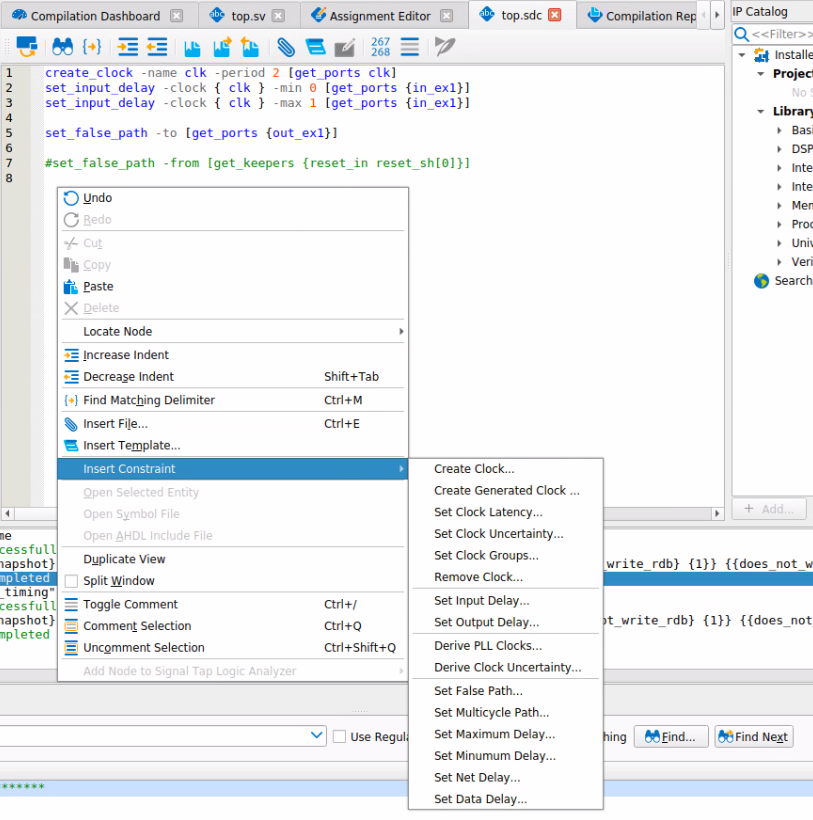
- The Quartus Prime Pro text editor includes an sdc constraint editor
![insert constraint]()
- includes node finder to filter on names in your design
- If constraining to an internal node, remember to use
preserve,nopruneorkeepto ensure a named node that you are attaching a constraint to is retained
Synthesis only over-constrain
As the fitter works on heuristics, a decision at placement may not be optimal and we may be able to see how to improve results on the finalised design.
Old way (before Stratix 10 / Agilex)Use
$::TimingAnalyzerInfo(nameofexecutable)to define constraints that are not evaluated for sign-offset_max_delayto encourage the fitter to place registers near to each other# Example Fitter overconstraint targeting specific nodes if { $::TimingAnalyzerInfo(nameofexecutable) eq "quartus_fit"} { set_max_delay -from ${my_src_regs} -to ${my_dst_regs} 1ns }
For hyperflex devices (Agilex, Stratix 10)
use
[is_post_route]to affect placement but not retiming.# Example Fitter overconstraint targeting specific nodes (allows for post-route retiming) if { ! [is_post_route]} { set_max_delay -from ${my_src_regs} -to ${my_dst_regs} 1ns }
If using a separate file add the
-read_during_post_syn_and_not_post_fit_timing_analysisin your .qsf fileset_global_assignment -name SDC_ENTITY_FILE <file>.sdc -entity <name> -read_during_post_syn_and_not_post_fit_timing_analysis
Constraint principles
- A reminder on knowledge already familiar to people who have used sdc constraints
- Constraints do not have any knowledge of your design, unless you use a multicycle exception, setup analysis is always on the destination latch edge following a launch edge and hold is on the destination latch edge preceding the one used for setup.
- Situations where you likely want to use
set_multicycle_path- a PLL introduces a small positive offset in destination clock - by default the setup window may be vanishingly small
- fast to slow or slow to fast transitions
- For clocks where all transfers are protected with some sort of
metastable safe transfer
set_clock_groupsmay be used to remove analysis between defined groups of clocks - but beware to check that all transfers really are protected.
Constraint workflow
- Define clocks with the maximum frequency that you require
- Compile design (only need to compile to stage
dni_synthesize) - Use Timing Analyzer to
Report Clocks,Report SDC
- Compile design (only need to compile to stage
- Define IO constraints using
set_input_delayandset_output_delay- Compile design (only need to compile to stage
dni_synthesize) - Use Timing Analyzer to
Report Unconstrained Paths
- Compile design (only need to compile to stage
- Define exceptions
Design walkthrough
- switch to Quartus Prime Pro software
dual clock FIFO constraints
- A FIFO comprises a simple dual port memory, counters for read side and write side and comparison logic to calculate fill level and optionally disable writes or reads to prevent overflow
- If there are different read and write clocks, then the counters need to be transferred from one domain to the other.
- use gray coded counters + double register transfer
- only one bit changes at a time so the value is either current - 1 clock or 2 clocks.
- old constraint methodology
- use
set_false_pathas the transfer is double registered - but what if the skew across the vector is > one clock cycle?
- On high utilization designs, these registers could be spread out because the timing constraint has been removed
- We have already seen that delays of >3ns are feasible even on a small device
- use
- new constraint methodology
set_max_skewto ensure skew is < clk periodset_max_delayandset_min_delayto large values to effectively make skew the only constraint- Generate IP Catalog -> FIFO IP to see an example sdc
Metastability
- Enable auto identification of register chains and metastability analysis in Assignments -> Settings -> Timing Analyzer
- Define minimum MTBF per register chain in settings - the default is 10^9 years which is very conservative, you should probably change to something more realistic for your application
FSM processing
- Using
enumtypes for state machines can separate intent from implementation and subsequently make changing encoding style easier - You can use the
syn_encodingattribute to control encoding as control how the FSM is encoded in hardwaresequential- binarysafe- one-hot with protection logic - use if your state machine may enter invalid states (eg async reset)one-hot- each state represented by one bit (two changes between any state)gray- adjacent states differ by one bit, can represent 2^M statescompact- least bits to represent statejohnson- adjacent states differ by one bit, can represent 2*M states, less logic than gray
- The Synthesis > State Machines report is useful for checking implementation
- By default, Quartus implements safe machines
- The
set_global_assignment -name SAFE_STATE_MACHINEcan be set toAUTO | ALWAYS | NEVER - The
SAFE_STATE_MACHINEassignment is still overridden by rtl attributes
- The
Shift register conversion
By default, the software will convert shift register structures to a RAM structure (utilizing MLAB)
- Called altshift_taps
Can be disabled globally or on a per instance basis
set_global_assignment -name auto_shift_register_recognition off
set_instance_assignment -name auto_shift_register_recognition off -to foo
Can constrain performance
- Experience from the SIMT Soft Processor study showed fmax reduced to 850MHz
Conversion reduces logic utilization